


MyEndeavor
4.3548.00 Reviews
App Specs
- Version
- 11.8.3
- Updated On
- License
- Free
- Downloads
- 100,000+
- Developer
- Endeavor Health
- Categories
- Medical
- Platform
- Android
Screenshots
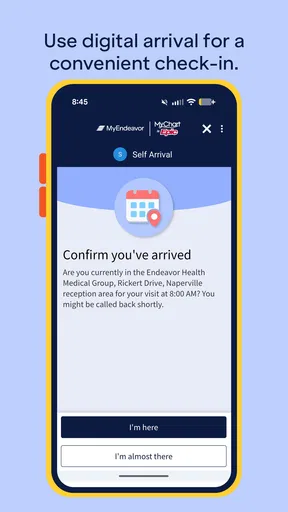
 Analysis by AppCompare
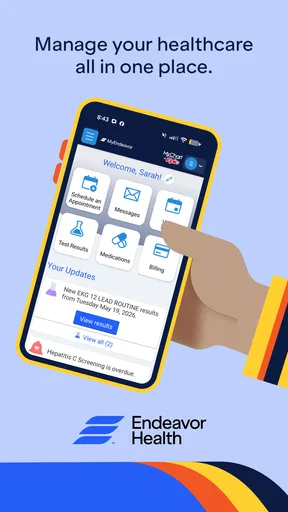
When I use a medical app, I care less about flashy presentation and more about whether I can find the right information when I am tired, worried, or dealing with a health task that cannot wait. MyEndeavor is the Android app from Endeavor Health, and its main appeal is that it puts a healthcare organization’s digital access point on a phone rather than making every interaction depend on a browser or a phone call. I found it most useful as a companion for people who already receive care through Endeavor Health and want a more direct way to manage routine parts of that relationship.
It is a free medical app for Everyone, which makes it approachable for households with different ages and levels of technical confidence. The app has been available since the end of 2015, and its current version is 11.8.3. That long presence matters to me because a healthcare app is not something I want to replace casually: I want a tool that feels like an established part of an organization’s digital service rather than a temporary experiment.
How MyEndeavor feels to use in real life
I focus on the small practical choices that shape a medical app experience: whether I can prepare before an appointment, find my way back to a task, and avoid relying on memory when I’m distracted. I also consider how a phone’s accessibility settings and a trusted helper can make those moments easier without taking control away from the patient. That everyday perspective matters most when deciding what to try before care becomes time-sensitive.
Readability and navigation come before convenience
My first test with any healthcare app is simple: can I understand where to begin without having to decode the interface? MyEndeavor benefits from being focused on one health system instead of trying to act as a general wellness platform. That narrower purpose can make the experience feel less distracting than an app filled with exercise tracking, symptom content, advertisements, or unrelated health products.
For someone who is comfortable with smartphones, the basic idea is easy to grasp. You open the app, identify the healthcare task you need to handle, and work through the available account or care options. That sounds ordinary, but it is important in medical settings. When I am booking or checking something related to care, I do not want entertainment-style navigation, hidden gestures, or a maze of promotional cards competing for attention.
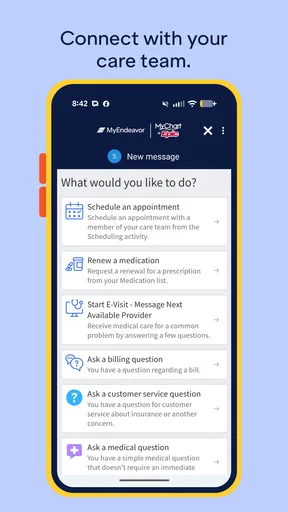
The strongest readability choice is the context itself. A user generally approaches MyEndeavor with a specific reason: checking an appointment-related detail, managing communication with a care provider, or handling another part of an existing patient relationship. That intention gives the app a clearer starting point than a broad health-information service. I would still advise taking a moment to read each screen carefully, especially when a task involves personal information or a clinical decision.
People with reduced vision may find familiar phone-level tools useful while using the app, such as larger system text, display magnification, or a screen reader where the operating system supports those tools. However, I would not assume that every screen will be equally comfortable with every setting. Text enlargement can change how much information fits on a page, and medical interfaces sometimes become harder to scan when labels wrap or controls move. My practical advice is to test the app before an urgent appointment rather than discovering a layout problem at the worst possible time.
Worth Reading Before You Choose

EA SPORTS FC Mobile 26 Is a Bigger Football Game, but It Takes Time

Flipboard Shows What News Apps Must Do Beyond the Feed

Switching to Android Auto Means Rethinking Your Driving Routine

Google Calendar Makes a Crowded Week Easier to Manage

Ludo King Makes the Most of the Minutes Between Plans

Baby Panda World Brings Quick Play to Modern Phones, but Its Game Library Feels Busy
There is also a useful distinction between readable content and understandable content. A large font does not automatically make a medical instruction clear. MyEndeavor is best treated as a doorway to care tasks, not as a substitute for asking a clinician to explain something confusing. If a message, appointment detail, or instruction is unclear, I would use the app to locate the relevant care contact and then ask for clarification instead of guessing.
Motor and sensory considerations
Healthcare apps can be difficult for people who have tremors, limited dexterity, fatigue, or difficulty maintaining attention. MyEndeavor is more suitable for deliberate, short sessions than for hurried one-handed use while walking through a hospital or trying to manage several things at once. I prefer to sit down, use a stable connection, and complete one task at a time. That reduces the chance of tapping the wrong control or abandoning a form halfway through.
A phone’s accessibility settings can make a meaningful difference. Voice control, switch access, larger touch targets provided by the operating system, and reduced visual distractions may help some users. These tools are not a replacement for thoughtful app design, but they can make the difference between independently completing a routine task and needing another person to take over.
For users who are sensitive to dense screens or too much information, the app’s healthcare focus is an advantage. It is not trying to keep me scrolling through a feed. Still, medical information can feel mentally heavy even when the interface is visually calm. A person dealing with pain, medication effects, anxiety, or cognitive fatigue may need a support person nearby, particularly during account setup or a task involving several steps.
One practical workflow I recommend is preparing the phone before opening MyEndeavor. Increase the text size only as much as needed, turn on the accessibility shortcut you already know how to use, and make sure the device is charged. If you are helping a relative, let that person make the choices and read the information aloud only when requested. Assistance should support independence rather than quietly replacing it.
People with hearing loss may appreciate handling healthcare interactions in written form when the app provides that route, because written communication can be easier to review than a phone conversation. At the same time, I would not assume that every urgent or sensitive situation can be managed inside the app. If the issue is time-critical, a direct clinical or emergency channel remains more appropriate than waiting for an in-app response.
Situational access: where the app earns its place
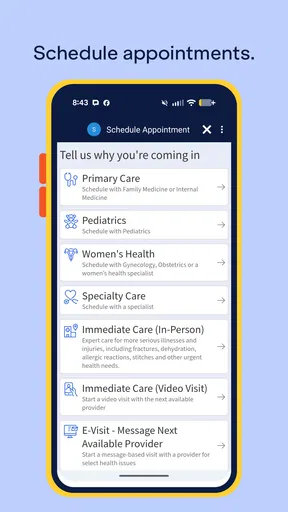
The best everyday use case I found is the routine appointment day. Imagine checking a detail while leaving home, reviewing what you need before arriving, and using the phone as a reference rather than searching through old messages or paper notes. That small reduction in friction can matter when a patient is already nervous, short on time, or accompanied by a child.
MyEndeavor can also be useful for a family member who helps coordinate care. The important boundary is consent and account ownership: a helper should not assume that being a spouse, adult child, or caregiver automatically gives them the right to view another person’s health information. I would set up the app with the patient present, agree on what help is wanted, and avoid saving sensitive details in places where other people can casually see them.
For people who travel between home, work, and medical appointments, a phone-based option is more convenient than relying on a desktop computer. It is particularly practical when a reminder or care-related message needs attention away from home. That said, convenience depends on the phone itself. A cracked screen, poor reception, low battery, or unfamiliar device can turn a simple task into a frustrating one, so I would keep essential appointment information available through the normal channels as well.
The app may be a good fit for someone who has difficulty making phone calls because of hearing, speech, anxiety, work restrictions, or limited privacy. Written digital access can give that person more control over timing and review. Yet this benefit has a limit: an app cannot remove the need for live help when a problem requires immediate clinical judgment, emotional reassurance, or a detailed conversation.
Older adults can use MyEndeavor successfully if the setup is paced properly. I would avoid creating an account while rushing to an appointment. Instead, use a quiet moment, keep login details in a secure password manager or another safe method, and practice opening the app before health information is urgently needed. A trusted helper can guide the process, but the patient should remain aware of what is being shared and why.
How it compares with the usual alternatives
The most obvious alternative is a mobile browser. A browser can be more flexible across devices and may be preferable for someone who dislikes installing apps or has limited storage. MyEndeavor feels more natural for repeated access because it is already positioned as a dedicated medical tool. I do not have to remember which web page to open or sort through unrelated browser tabs, but I am also committing to the app’s own way of organizing care tasks.
Another alternative is calling the healthcare organization. Phone support remains better when I have a complicated question, need immediate clarification, or cannot complete a digital step. The app is better for routine, repeatable actions that I want to handle privately and at my own pace. In my view, the two options complement each other rather than compete. Treating the app as a complete replacement for human support would create unnecessary frustration.
Paper reminders and printed instructions still have a place, especially for people who do not use smartphones confidently or who need something visible during a stressful appointment. MyEndeavor is easier to carry and update, but paper can be easier to share with a caregiver or annotate by hand. I would use the app for current digital access and keep a simple written backup for important dates or preparation notes.
General health apps are another poor substitute when the task is tied to Endeavor Health. They may offer symptom tracking or educational material, but they do not automatically provide the same organization-specific context. Conversely, someone looking mainly for fitness goals, nutrition logging, medication reminders from multiple providers, or broad medical education may find a general-purpose app more suitable than this focused patient companion.
Remaining barriers I would think about first
The biggest barrier is not necessarily the interface; it is the relationship between the app and the healthcare system. MyEndeavor makes the most sense for a person already connected with Endeavor Health. If your care is spread across unrelated providers, the app may cover only one part of your health life, leaving you to switch between systems. That fragmentation is common in healthcare, but it can make a single app feel less complete than expected.
Digital confidence is another dividing line. A person who regularly uses phone apps will probably understand the general workflow quickly. Someone who struggles with passwords, account verification, small controls, or changing screens may need help. I would not judge the app solely by how quickly a technically confident user completes a task; independence matters just as much as speed.
Privacy also deserves active attention. A shared phone, visible notifications, automatic screen previews, or an unlocked device can expose health information even when the app itself is secure. I recommend using a device lock, reviewing notification visibility, and signing out or switching accounts carefully when a phone is shared. These are sensible habits for any medical app, but they are especially important when family members use one device for convenience.
There is a difference between being able to open an app and being able to use it during a crisis. Someone experiencing severe symptoms, confusion, or an emergency should not spend time navigating MyEndeavor. The app is designed for access to routine healthcare interactions, not for replacing emergency services or professional diagnosis. That limitation is not a flaw unique to this product, but users should understand it before depending on a phone as their only health resource.
Language, literacy, and cognitive load can also affect the experience. A user may be able to read every label and still struggle with medical vocabulary or the consequences of choosing the wrong option. I would involve a clinician or trusted interpreter when the decision is important, rather than asking a family member to translate casually or relying on an automatic translation that could change the meaning.
Who should use it, and who should choose something else
I would recommend MyEndeavor to Endeavor Health patients who want a direct Android-based way to stay connected with routine care tasks and who are comfortable managing personal information on a phone. It is also worth considering for caregivers who assist with logistics while respecting the patient’s control over the account. The free price removes a financial barrier, and the Everyone age rating makes it broadly approachable for households.
I would be more cautious about recommending it to someone who needs one unified dashboard for several unrelated healthcare systems. A browser-based approach or a broader personal health-management method may be more practical in that situation. I would also steer a person toward phone or in-person support when the main need is a complicated medical discussion, urgent advice, or hands-on assistance with digital setup.
The app’s reach suggests that it is not an obscure experiment: it has passed one hundred thousand installs, carries a 4.3 average from roughly four thousand ratings, and has several hundred written reviews. Those figures give me reasonable confidence that many Android users have incorporated it into their healthcare routines, although popularity alone does not guarantee that every patient’s experience will be smooth.
What I like most is the possibility of handling ordinary care administration without turning every small request into a phone call. What I would not do is assume that the app’s presence makes healthcare automatically accessible to everyone. Accessibility depends on the phone, the user’s abilities, the clarity of the task, the available support, and whether the person’s care is actually connected to Endeavor Health.
An inclusive verdict for everyday healthcare access
After looking at MyEndeavor through the lens of different abilities and situations, I see it as a focused tool rather than an all-purpose medical solution. Its value comes from bringing Endeavor Health access into a familiar mobile setting, where a patient can work at their own pace and return to information when needed. The experience is likely strongest for routine tasks, planned appointments, and users who benefit from written digital access.
My practical recommendation is to set it up before you need it. Explore the navigation in a calm moment, adjust the phone’s text and control settings, decide who may help you, and keep a non-digital backup for important care details. That preparation makes the app more useful for people with limited dexterity, low vision, hearing differences, anxiety, fatigue, or simply a busy schedule.
MyEndeavor is not the right answer for emergencies, complex clinical conversations, or every person managing care across multiple organizations. For those situations, a phone call, an in-person visit, or another health platform may be better. But for an Endeavor Health patient who wants a free, established Android medical companion, I think it is a sensible option to try. The key is to use it as one accessible route into care, not as a replacement for the human support that healthcare sometimes requires.
Pros
- Simple interface makes tracking personal goals easy.
- Helpful reminders encourage consistent progress.
- Supports multiple goals at the same time.
- Progress tracking makes achievements easy to review.
- Useful for building routines and healthier habits.
Cons
- Some features may require an account or personal data.
- Customization options may feel limited for advanced users.
- Notifications can become repetitive during long-term use.
- Progress insights may be too basic for detailed planning.
- Requires regular manual updates to keep information accurate.
FAQs for MyEndeavor
What is MyEndeavor and what can I use it for?
MyEndeavor is an app designed to help users organize, follow, and manage personal goals, activities, or ongoing endeavors in one place. Depending on the features available in your version, it may provide tools for tracking progress, reviewing updates, and maintaining motivation. Before downloading, check the official description to confirm that its specific functions match the type of planning or progress monitoring you need.
Is MyEndeavor free to download and use?
MyEndeavor may be available as a free download, although some functions could require in-app purchases, a subscription, or an account. Pricing and included features can vary between Android and iOS, as well as by region. We recommend checking the app store listing carefully before installing, especially the subscription terms, renewal conditions, trial period, and whether essential tools are restricted to premium users.
Does MyEndeavor require an account or an internet connection?
The account and connectivity requirements depend on how MyEndeavor stores and synchronizes your information. Some features may work offline, while creating an account or accessing saved progress across multiple devices could require an internet connection. If privacy or mobile data usage is important to you, review the permissions and privacy policy before registration, and confirm whether your information is stored locally or in the cloud.
Is MyEndeavor suitable for beginners?
MyEndeavor can be useful for beginners if you want a straightforward way to start organizing goals or monitoring progress. However, the experience may depend on how clearly the app explains its tools and how much setup it requires. New users should explore the introductory screens, settings, and help information first. If you prefer a very simple interface, check screenshots and recent reviews before downloading.
What privacy and device permissions does MyEndeavor use?
Before installing MyEndeavor, review the permissions requested by the app and the data practices described in its official privacy policy. Depending on its features, it may request access to notifications, storage, account information, or other device functions. Only grant permissions that are necessary for the tools you plan to use, and verify the developer, last update date, and store listing to avoid downloading an unofficial version.


